![709081_APP-Logo White_042920-2.png]](https://knowledge.agencyperformancepartners.com/hs-fs/hubfs/709081_APP-Logo%20White_042920-2.png?width=50&height=50&name=709081_APP-Logo%20White_042920-2.png)
Associated Documents
Client Concierge Introduction & Start Gathering Ideal Meeting Times
Week of 10.18.25
- Client Concierge team needs to update Association Labels for their clients (this fuels the Client Health Score)
- Review each client
- Delete the Owner and Leader association label if the person is not listed here
- Add it if they are
- Send this email to your Owner and Leader contacts from this list
- NOTE: The list linked above is different than the association list - you need to view if the client does or does not have meetings.
- Email Template Name: 2026 Meeting Plan: Meeting Times
- CC the Performance Partner
- Set a task to follow up 3 business days later
- Please update the spreadsheet that they have been contacted
- If the client does not respond you do not need to task the PP we will get with them at a later time once they are slated (see column H)
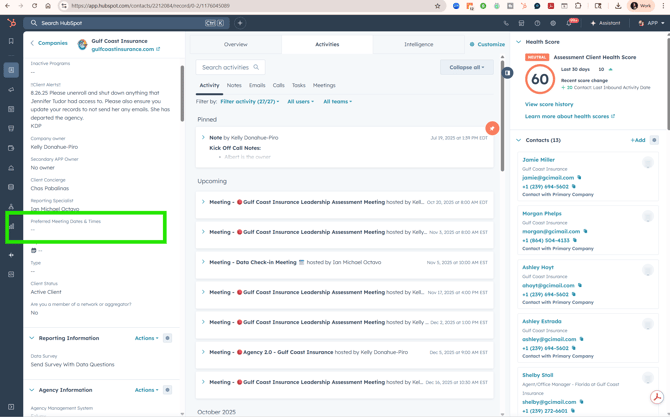
- When you get responses you will want to document the Company Field in Hubspot here (Preferred Meeting Dates & Times):
Client Concierge Project
Please work together to identify the best plan for the following:
- How we will track each clients spot - we numbered the clients in the ideal week template note this is easy for our consulting clients some of our retainers are monthly, quarterly and bi-monthly
- Identify how we can "see" each performance partners week so you can schedule clients and the PP team can schedule travel and on site visits easily.
- Let's all work together to come up with a great idea to share on the Client Concierge meeting on 10/21 from there we will have you get started organizing it!
Week of 10.27
- Follow up with clients who have not responded to the ideal dates and time
- We need to work together to slate clients that are shared first:
- Kelly & Stephen: Distefano, Smith Davis & Flatlands Jessup - Note Stephen is primary on all of these and Kelly is secondary
- Kelly & Gina: Summit (starting this week), Etler, Mosaic, Gordon
- Gina & Stephen: Coachlight
- Kelly & Latoya: Lakeshore, HRI, Leavitt, Security 1st
- Stephen & Latoya: Thompson, Danville, Jessie, Cedar Risk (starting in January), Jones
- Create the plan for 2026 by starting with these clients to fill in. Put holds in our calendar for the times and dates. Note some of these clients will be changing programs but this will give us a start. You may need to work together as these will cause some great CC Team building!
- Going forward on all Kick Off Calls the CC Team will need to confirm the times clients cannot meet and update Hubspot. We will want to start slating clients after that meeting.
- Once ready send the plan to us for approval and we will work on an announcement to the clients.
Week of 11.3.25
- Work to slate the remaining consulting clients.
Week of 11.17.25
Start Reaching Out To Consulting Clients to Confirm Their Meetings
- Monday: Please send your consulting clients this email: 2025: Client Meeting Organization Email for 2026
- Please update the client's date and time
- Ensure you are sending it in their time zone
- CC the Performance Partner
- Create a task from the email to follow up Wednesday
- Wednesday: Please send a follow up to the client - resend the first email and add a friendly message to the top following up.
- Friday: Reassign the task to the PP for any client you have not heard from. Any clients still in process (you have heard from them but they have not confirmed it) you can keep the task and reassign it to the PP next Wednesday if not confirmed.
Any client questions you can't answer pull in the PP. If a client would like a different date and time work to move them on your own and if you need help contact the PP.
Scheduling 2026 Confirmed Meetings
- Identify who is on the current meetings note this
- Work to cancel the existing meetings for 2026 - please work to not send out the cancellation notice if at all possible to avoid client disruption. It will still occur but lets do our best.
- If the client prefers us to send the team an email before cancelling note this. You can send this email. 2026 Meeting Move: Team Email Alert
- Add the new meeting to the calendar set to repeat to the end of the program/client contract.
- Client Contract is for leadership meetings: You can see it on the company screen
- End of Program: You can track this to the last training lesson on the company screen.
- Place a space holder for future training lessons for 2 year program clients. (Generally the team members will change so you want to have this blocked off for when we change programs).
- When booking the meetings it is critical that the following exist:
- Zoom Meeting Link
- We set it up as a re-occurring meeting
- The accurate people on the invite
- With a repeat meeting the client will only get 1 email invite (which is acceptable)
- Every meeting will need to have a meeting type (you will need to set these manually). Here is a quick video.
-
-
- Onboarding Meetings: Meeting Types:
-
-
-
-
- Assessment Kick Off Call
- Reporting Set Up Call
- Initial Reporting Reveal Meeting
- Phone Call Review Set Up
- Phone Call Review Results
- Telling The Team
- Leadership Meeting Meeting Types
- Emerging Agency: Emerging Agency: Leadership Meeting
- 1 Year Program: 6 Month Program Leadership Meeting
- 2 Year Program: 2 Year Program Leadership Meeting
- Training Programs:
- Efficiency Training Lesson
- Retention Training Lesson
- Sales Training Lesson
-
- Add a task to review 1 Week out your PP's calendar and ensure that all client meetings have a meeting type. This triggers important workflows.
-
If you have any questions on this let KDP know she can add additional meeting types in or guide you.
Avoma Internal Meeting Scoring
- At APP we also score internal calls
- These fuel our Client Health Scores
- With the transition we have missed scoring calls
- We need to go back to all of October and November leadership client calls as well as onboarding calls to score them. Here is a video on what to do
- Here are the scorecards to use:
- Onboarding Meetings: Meeting Types:
- Meeting Type: Agency Assessment Kick Off Call - Avoma Scorecard: Agency Assessment Kick Off Call
- Meeting Type: Reporting Set Up Call Avoma Scorecard: Initial Reporting Set Up Meeting
- Meeting Type: Initial Reporting Reveal Meeting Avoma Scorecard: Initial Reporting Reveal Meeting
- Meeting Type: Phone Call Review Setup - Avoma Scorecard: Secret Shopper/Recorded Call Selection Call
- Meeting Type: Phone Call Review Reveal - Avoma Scorecard: Phone Call Review Reveal
- Meeting Type: Telling The Team - Avoma Scorecard: Telling The Team
Please set a task to do this at the beginning of each day for the previous days calls.