![709081_APP-Logo White_042920-2.png]](https://knowledge.agencyperformancepartners.com/hs-fs/hubfs/709081_APP-Logo%20White_042920-2.png?width=50&height=50&name=709081_APP-Logo%20White_042920-2.png)
Purpose of This Process
Keeping meeting types and outcomes up to date allows PPs to maintain a clear and streamlined schedule. It also ensures our clients always have an accurate reference for upcoming and completed meetings.
Desired Outcome of Updating Meeting Types and Outcomes
By consistently following this process, PPs will be able to:
- Stay organized with all client-related meetings
- Keep clients informed about their scheduled sessions
- Maintain accurate records for internal tracking and reporting
Meeting Types
Onboarding Meetings
| Hubspot Meeting Type | Avoma Meeting Purpose | Avoma Scorecard |
| Reporting Set Up Call | Reporting Set Up Call | Initial Reporting Set Up Meeting |
|
Initial Reporting Reveal Meeting |
Initial Reporting Reveal Meeting | Initial Reporting Reveal Meeting |
| Phone Call Review Set Up | Phone Call Review Set Up | Secret Shopper/Recorded Call Selection Call |
| Phone Call Review Results | Phone Call Review Results | Phone Call Review Reveal |
| Telling The Team | Telling The Team | Telling The Team |
| Agency Interview | Agency Interview | Agency Interview |
Leadership Meetings
| Hubspot Meeting Type | Avoma Meeting Purpose | Avoma Scorecard |
| 2-Year Program Leadership Call – For agencies enrolled in a 2-year program | 2 Year Program Leadership Meeting | Client Health: Agency Assessment Leadership Call AI |
| 6-Month Program Leadership Call – For agencies in the Agency Assessment Program | 6 Month Program Leadership Meeting | Client Health: Agency Assessment Leadership Call AI |
| Emerging Agency Leadership Call – For Emerging Program agencies | Emerging Agency: Leadership Meeting | Client Health: Agency Assessment Leadership Call AI |
Retainer Meetings
| Hubspot Meeting Type | Avoma Meeting Purpose | Avoma Scorecard |
| Retainer Meeting | Retainer Meeting | Client Health: Retainer Scorecard |
- Workflow: Future Retainer meetings should be set to a meeting type of Retainer Meeting from this workflow
- Current Booked meetings (booked before 5/2/26) we will need to manually score and discuss meetings to be scored on the pod meetings.
- Efficiency Training Lesson – Agency Efficiency Program
- Retention Training Lesson – Agency Retention Program
- Sales Training Lesson – Agency Growth/Sales Program
Meeting Outcomes
- Scheduled
- Completed
- Rescheduled
Unacceptable Actions For Updating Meeting Types
and Outcomes
To maintain accuracy, please avoid the following:
- Not reviewing scheduled meetings regularly.
- Forgetting to update the meeting type (Program/Leadership) and outcome after sending a new Zoom invitation.
Steps to Update Meeting Types and Outcomes
- Set a weekly task to review and update meeting types and outcomes for all active client programs.
- In the Company Screen, navigate to:
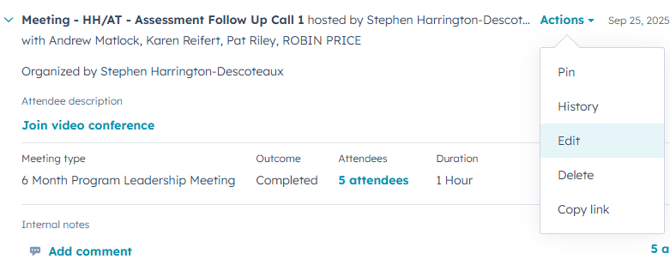
Activities Tab → Meetings Tab → Upcoming Meetings - Locate the meeting you need to update, then select:
Actions → Edit
4. Update the Meeting Type to match the correct Program or Leadership meeting.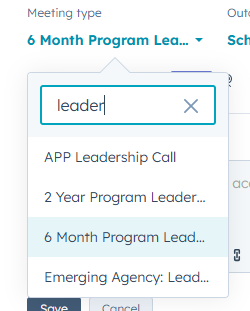
5. Update the Outcome to Scheduled.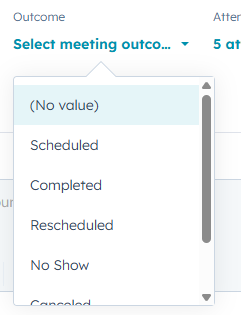
Author of the Article: Angel Guiriba